ثبت نام / ورود
0
ثبت نام / ورود
0
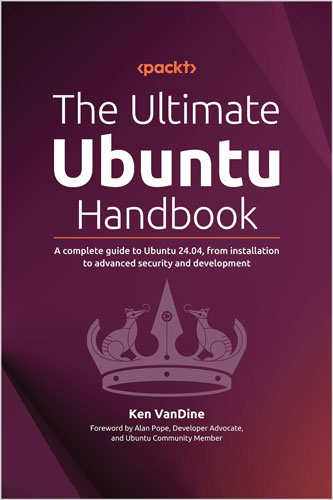
A complete guide to Ubuntu 24.04, from installation to advanced security and development
Ken VanDine
#Ubuntu
#Handbook
#security
تقویت مهارتهای شما در اوبونتو 24.04 با راهنمایی عملی از یک توسعهدهنده هسته اوبونتو، شامل استفاده از دسکتاپ، بهترین شیوههای امنیتی، کانتینرها و راهاندازی محیط توسعه
ویژگیهای کلیدی
توضیحات کتاب
اوبونتو 24.04 ویژگیهای قدرتمند جدیدی به همراه دارد، اما بیشتر کاربران تنها سطح ابتدایی پتانسیل آن را لمس میکنند. این کتاب شما را از یک کاربر مبتدی به یک کاربر حرفهای اوبونتو تبدیل میکند و شما را گام به گام از طریق نصب، امنیت و جریانهای توسعه هدایت میکند. کن وانداین دانش داخلی و استراتژیهای اثباتشدهای را که اوبونتو را به یک پلتفرم توسعه پایدار، امن و تولیدی تبدیل میکند، فاش میکند.
این کتاب با مأموریت اوبونتو، دورههای انتشار و ویژگیهای جدید در 24.04 شروع میشود و شما را از نصب سیستم، شخصیسازی دسکتاپ و استفاده از خط فرمان برای کار کردن کارآمدتر، آشنا میکند. کتاب نحوه اعمال بهروزرسانیها، فعالسازی اوبونتو پرو، پیکربندی فایروالها و امنیت دادهها با رمزگذاری کامل دیسک را نشان میدهد، سپس به موضوعاتی میپردازد که اغلب توسط کاربران دسکتاپ نادیده گرفته میشوند. به سمت مباحث پیشرفتهتر، این کتاب به توسعه مبتنی بر کانتینر با استفاده از LXD، کار با ماشینهای مجازی از طریق Multipass و راهاندازی Kubernetes با MicroK8s میپردازد. چه در حال ساخت اپلیکیشنهای ابری و بومی باشید و چه پروژههای علوم داده، شما از جریانهای قابلاعتماد و تکرارپذیر اوبونتو بهره خواهید برد.
فراتر از مهارتهای فنی، شما یاد میگیرید که چگونه از جامعه جهانی اوبونتو برای پشتیبانی مستمر و فرصتهای مشارکت استفاده کنید. این کتاب برای افرادی که تازهکار در لینوکس هستند یا حرفهایهای با تجربهای که میخواهند بیشترین بهره را از اوبونتو ببرند، ایدهآل است.
چه چیزی خواهید آموخت
برای چه کسانی این کتاب مناسب است
این کتاب برای مهندسان نرمافزار، حرفهایهای DevOps، دانشمندان داده، مدیران سیستم و علاقهمندان به فناوری است که میخواهند با اوبونتو 24.04 دست به کار شوند. چه شما تازهکار در لینوکس باشید و چه بخواهید تنظیمات خود را بهبود ببخشید، این کتاب به شما نشان میدهد که چگونه یک دسکتاپ امن بسازید، با اطمینان از خط فرمان استفاده کنید و محیطهای توسعه تمیز و قابلاعتماد ایجاد کنید. آگاهی ابتدایی از سیستمعاملها مفید است اما الزامی نیست.
فهرست مطالب
بخش 1: آشنایی با اوبونتو
بخش 2: استفاده بهینه از سیستم اوبونتو
بخش 3: امنیت و حریم خصوصی
بخش 4: اوبونتو، پلتفرم نهایی توسعه
درباره نویسنده
کن وانداین از طریق کنجکاوی ذاتیاش نسبت به چگونگی کارکرد چیزها وارد دنیای متنباز شد. او که نمیتوانست کد سیستمعاملهای اختصاصی را بررسی یا اصلاح کند، لینوکس و متنباز را از طریق Slackware در سال 1993 کشف کرد. بهزودی، مسئولیت رایانش با عملکرد بالا (HPC) در یک شرکت داروسازی بزرگ را برعهده گرفت و یک خوشه توزیعشده لینوکس جهانی طراحی کرد و سیستمهای لینوکس خاصی ساخت که به سمت نقشهای بعدی در متنباز و حل مسائل توزیع و بهینهسازی نرمافزار سوق پیدا کرد. کن بیش از 30 سال تجربه در ساخت توزیعهای لینوکس دارد و بیش از 16 سال در Canonical روی اوبونتو کار کرده است. در دوران حرفهایاش در Canonical، تمرکز او روی GNOME، دسکتاپ اوبونتو و ادغام Snap بوده است. زمانی که کن مشغول به کار نیست، از داوطلبی با موسسه Kramden، یک موسسه غیرانتفاعی محلی که هدف آن پل زدن شکاف دیجیتال است، لذت میبرد، مربیگری بیسبال جوانان را انجام میدهد و زمان خود را با خانوادهاش سپری میکند.
Build your Ubuntu 24.04 skills with hands-on guidance from an Ubuntu Core developer, covering desktop usage, security best practices, containers, and development environment setup
Ubuntu 24.04 brings powerful new features, but most users barely scratch the surface of its potential. This book transforms you from a basic user into an Ubuntu power user by guiding you through setup, security, and development workflows step by step. Ken VanDine reveals insider knowledge and proven strategies that turn Ubuntu into a stable, secure, and productive development platform.
Starting with Ubuntu’s mission, release lifecycles, and what’s new in 24.04, you’ll learn how to install the system, customize your desktop, and use the command line to work more efficiently. The book shows you how to apply updates, activate Ubuntu Pro, configure firewalls, and secure data with full disk encryption before covering topics often overlooked by desktop users. Moving into advanced territory, this book covers container-based development using LXD, working with virtual machines through Multipass, and setting up Kubernetes with MicroK8s. Whether you’re building cloud-native apps or data science projects, you’ll benefit from reliable and repeatable Ubuntu workflows.
Beyond the technical skills, you'll discover how to tap into Ubuntu's global community for ongoing support and opportunities to contribute. This book is ideal for both newcomers eager to accelerate their Linux journey and seasoned professionals seeking to maximize their Ubuntu expertise.
This book is for software engineers, DevOps professionals, data scientists, systems administrators, and tech enthusiasts who want to get hands-on with Ubuntu 24.04. Whether you're new to Linux or looking to improve your setup, this book shows you how to build a secure desktop, use the command line with confidence, and create clean, reliable development environments. A basic understanding of operating systems is helpful but not required.
Table of Contents
Part 1: Getting to Know Ubuntu
Chapter 1: Introduction to Ubuntu
Chapter 2: What's New in Ubuntu 24.04?
Chapter 3: Security and Transparency – The Advantages of Open Source Software
Chapter 4: Getting Started with Ubuntu: A User’s Guide
Part 2: Getting the Most Out of Your Ubuntu System
Chapter 5: Using Your Ubuntu Desktop
Chapter 6: Software Discovery: Finding and Installing Applications
Chapter 7: Software Updates: Enhancing Security and Stability
Chapter 8: Getting Help: The Ubuntu Community and Beyond
Chapter 9: Ubuntu in the Enterprise and at Scale
Chapter 10: Command-Line Tricks and Shortcuts: Boosting Your Efficiency
Part 3: Security and Privacy
Chapter 11: Introduction to Network Security
Chapter 12: Understanding Firewalls
Chapter 13: Safeguarding Information with Data Encryption
Part 4: Ubuntu, the Ultimate Development Platform
Chapter 14: Ubuntu for Developers
Chapter 15: Leveraging Containers for Development
Chapter 16: Cloud-Style VMs on Your Desktop
Chapter 17: Kubernetes Development on Your Desktop
Chapter 18: Building Your Data Science Toolkit
Chapter 19: Embracing the Spirit of Ubuntu
Ken VanDine found his way into open source by following his innate curiosity about how things worked. Unable to inspect and modify the code of proprietary operating systems, Ken discovered Linux and open source via Slackware in 1993. Soon, he was responsible for High-Performance Computing (HPC) at a large pharmaceutical company, architecting a globally distributed Linux cluster and building purpose-built Linux systems, which led to future roles in open source, solving software distribution and optimization. Ken has over 30 years of experience building Linux distributions, with over 16 years working at Canonical on Ubuntu. During his career at Canonical, his focus has been on GNOME, Ubuntu Desktop, and Snap integration. When Ken is not working, he enjoys volunteering with Kramden Institute, a local non-profit that aims to bridge the digital divide, coaching youth baseball, and spending time with his family.
Ubuntu 24.04 brings a refreshed installer, improved security, and a modern desktop experience, making it the most versatile release yet. Whether you're new or experienced, you’ll benefit from enhanced performance, protection, and usability.
In this book, you’ll explore and work with:
Whether you're deploying Ubuntu in the cloud, at the edge, or on your laptop, this comprehensive guide helps you unlock its full potential. Get hands-on with the latest Ubuntu release and see what’s possible.
Unlock Ubuntu’s full potential with real-world, hands-on guidance designed to boost productivity and efficiency, whether you're a casual user or an IT pro.
Knowledge and skills, you'll build:
From personal productivity to business scalability, this section equips you with the tools to make Ubuntu work seamlessly at any level.
You will also learn to take control of your digital safety. Whether you're a privacy-conscious user or managing critical systems, you'll learn how to protect your Ubuntu environment with confidence:
With clear examples, practical tips, and real-world use cases, this section gives you the tools to stay secure without being a security expert.
Unlock Ubuntu’s full potential with powerful tools and workflows for professionals:
From containers to Kubernetes, security to scripting—you’ll gain real-world, production-ready skills.
Ubuntu is a top choice for enterprise environments thanks to its stability, security, and scalability.
This book explores using Ubuntu for enterprise deployments, focusing on Landscape, Canonical’s web-based management tool for Ubuntu systems.
Landscape simplifies managing desktops, servers, and WSL instances across small or large fleets. It offers:
With Landscape, you can streamline administration and maintain control in enterprise settings.