ثبت نام / ورود
0
ثبت نام / ورود
0
Michael Alexander, Dick Kusleika
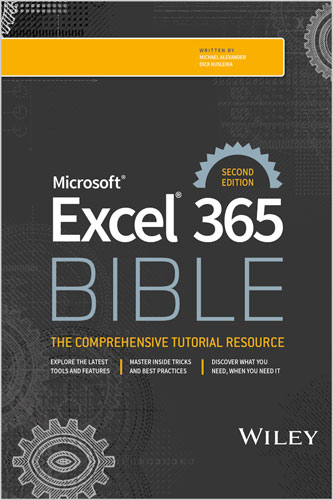
#Microsoft
#Excel
#365
#BIBLE
📘 راهنمای شخصی و عملی شما برای آشنایی با جدیدترین و کاربردیترین قابلیتهای Microsoft Excel 365
☁️ Excel 365 جدیدترین نسخه ابری اپلیکیشن صفحهگسترده مشهور مایکروسافت است. این نرمافزار قدرتمند و درعینحال کاربرپسند، راهکاری ایدهآل برای کسبوکارها و افرادی محسوب میشود که میخواهند دادههای خود را بهتر درک کنند و از آنها بینشهای ارزشمند به دست آورند.
📊 کتاب Excel 365 Bible بهترین مطالب کتاب پرفروش Excel 2019 Bible را حفظ کرده و درعینحال، شیوه استفاده نسل جدید کاربران از Excel 365 را نیز در نظر گرفته است. تیم نویسندگان کتاب با چندین دهه تجربه در زمینه Excel و هوش تجاری و برخورداری از عنوان Excel MVP، نقشه راهی قابلفهم، معتبر و جامع برای یادگیری Excel 365 ارائه میدهند.
🧩 به مباحث مقدماتی علاقه دارید؟ در این کتاب یاد میگیرید صفحهگستردهها و ورکبوکها را ایجاد کنید و در رابط کاربری Excel حرکت کنید. اگر برای موضوعهای پیشرفتهتر آماده هستید، میتوانید مستقیما سراغ بخشهای مربوط به ساخت مصورسازیهای داده، طراحی توابع سفارشی و استفاده از Visual Basic for Applications برای اسکریپتنویسی و خودکارسازی فرایندها بروید.
✨ در این کتاب همچنین به موارد زیر دسترسی خواهید داشت:
• بیش از ۹۰۰ صفحه نکته، ترفند و راهبرد کاربردی برای استفاده از تمام ظرفیتهای Microsoft Excel 365
• راهنمای وارد کردن، مدیریت و تحلیل حجم زیادی از دادهها
• توصیههایی برای ایجاد پیشبینیها و تحلیلهای «چه میشود اگر» براساس دادههایی که از قبل در اختیار دارید
🎯 کتاب Excel 365 Bible هم برای افرادی که بهتازگی کار با Excel را آغاز کردهاند و هم برای متخصصان و کاربران پیشرفته مناسب است. این اثر، راهنمایی جامع و قابلاعتماد برای تمام مطالبی است که باید درباره محبوبترین و کاربرپسندترین نرمافزار صفحهگسترده جهان بدانید.
📗 راهنمای بهروز شما برای Excel 365
🌍 Microsoft Excel 365 ابزار غالب صفحهگسترده برای افراد و کسبوکارها در سراسر جهان است. اکنون با ویرایش دوم کتاب Microsoft Excel 365 Bible میتوانید تمام اطلاعات موردنیاز خود را با توضیحاتی ساده و قابلفهم در یک منبع جامع پیدا کنید.
🧮 در این کتاب یاد میگیرید صفحهگستردهها را ایجاد و مدیریت کنید، فرمول بنویسید، از توابع سفارشی استفاده کنید، دادهها را بهشکل بصری نمایش دهید و گزارشهای حرفهای بسازید. این کتاب هم برای کاربران مبتدی و هم برای کاربران حرفهای و قدرتمند Excel انتخابی مناسب است.
🚀 با مطالعه این کتاب میتوانید:
• کار با Excel 365 را آغاز کنید و با قابلیتهای جدید آخرین نسخه آشنا شوید
• شیتهای خود را برای خوانایی بیشتر و داشتن ظاهری حرفهای قالببندی کنید
• روش ایجاد شیتها و ورکبوکها، وارد کردن دادهها و بسیاری از قابلیتهای دیگر را یاد بگیرید
• فرمولها و توابع اختصاصی خود را برای پردازش و محاسبه دادهها ایجاد کنید
• کار با Power Pivot و Power Query را یاد بگیرید
• با استفاده از چارتها و نمودارها، دادههای خود را مصورسازی کنید
• با تحلیلهای «چه میشود اگر»، ابزار Solver و دیگر ابزارهای ضروری، به یک متخصص تحلیل داده تبدیل شوید
• با استفاده از Microsoft Copilot کارهای خود را خودکار کنید و هوش مصنوعی را در فرایندهای کاری به کار بگیرید
• با استفاده از Office Scripts در Excel، فرایندهای نسخه آنلاین این نرمافزار را خودکار کنید
📖 فهرست مطالب
پارت I. شروع کار با Excel
فصل ۱. معرفی Excel
فصل ۲. وارد کردن و ویرایش دادههای شیت
فصل ۳. انجام عملیات پایه در شیت
فصل ۴. کار با محدودهها و جدولهای Excel
فصل ۵. قالببندی شیتها
فصل ۶. آشنایی با فایلها و قالبهای Excel
فصل ۷. چاپ کارها
فصل ۸. سفارشیسازی رابط کاربری Excel
پارت II. کار با فرمولها و توابع
فصل ۹. معرفی فرمولها و توابع
فصل ۱۰. درک و استفاده از فرمولهای آرایهای
فصل ۱۱. استفاده از فرمولهای رایج برای محاسبات ریاضی و تاریخها
فصل ۱۲. استفاده از فرمولها برای پردازش متن
فصل ۱۳. استفاده از فرمولها برای تحلیل شرطی
فصل ۱۴. استفاده از فرمولها برای تطبیق و جستوجوی دادهها
فصل ۱۵. استفاده از فرمولها همراه با قالببندی شرطی
فصل ۱۶. حذف خطاها از فرمولها
پارت III. ایجاد نمودارها و دیگر مصورسازیها
فصل ۱۷. شروع کار با نمودارهای Excel
فصل ۱۸. استفاده از تکنیکهای پیشرفته رسم نمودار
فصل ۱۹. ایجاد نمودارهای Sparkline
فصل ۲۰. مصورسازی با قالبهای عددی سفارشی و اشکال
پارت IV. مدیریت و تحلیل دادهها
فصل ۲۱. وارد کردن و پاکسازی دادهها
فصل ۲۲. استفاده از اعتبارسنجی دادهها
فصل ۲۳. ایجاد و استفاده از ساختارهای درختی شیت
فصل ۲۴. پیوند دادن و یکپارچهسازی شیتها
فصل ۲۵. معرفی PivotTable
فصل ۲۶. تحلیل دادهها با PivotTable
فصل ۲۷. انجام تحلیل «چه میشود اگر» در صفحهگسترده
فصل ۲۸. تحلیل دادهها با Goal Seek و Solver
فصل ۲۹. تحلیل دادهها با Analysis ToolPak
فصل ۳۰. محافظت از کارها
پارت V. آشنایی با Power Pivot و Power Query
فصل ۳۱. معرفی Power Pivot
فصل ۳۲. کار مستقیم با مدل داده داخلی
فصل ۳۳. افزودن فرمولها به Power Pivot
فصل ۳۴. معرفی Power Query
فصل ۳۵. تبدیل دادهها با Power Query
فصل ۳۶. هماهنگسازی و ترکیب کوئریها
فصل ۳۷. افزایش بهرهوری در Power Query
پارت VI. خودکارسازی Excel
فصل ۳۸. معرفی Visual Basic for Applications
فصل ۳۹. ایجاد توابع سفارشی شیت
فصل ۴۰. ایجاد UserForm
فصل ۴۱. استفاده از کنترلهای UserForm در شیت
فصل ۴۲. کار با رویدادهای Excel
فصل ۴۳. ایجاد افزونههای سفارشی Excel
فصل ۴۴. Office Scripts برای Excel
👥 درباره نویسندگان
👨💼 مایکل الکساندر مشاور ارشد شرکت Slalom Consulting است و بیش از پانزده سال در زمینه مدیریت داده و گزارشگیری تجربه دارد. او نویسنده بیش از دوازده کتاب درباره تحلیل کسبوکار با استفاده از Microsoft Excel است و بهدلیل مشارکتهای ارزشمندش در جامعه کاربران Excel، عنوان Microsoft Excel MVP را دریافت کرده است.
💻 دیک کوسلایکا بیش از بیست سال است که با Microsoft Office کار میکند. او پیشتر بهمدت دوازده سال متوالی عنوان Microsoft MVP را دریافت کرده بود و چندین کتاب درباره Excel و Access نوشته است.
Your personal, hands-on guide to the latest and most useful features in Microsoft Excel 365
Excel 365 is Microsoft’s latest cloud-based version of its world-famous spreadsheet app. Powerful and user-friendly, it’s an ideal solution for businesses and people looking to make sense of―and draw intelligence from―their data.
The Excel 365 Bible carries over the best content from the best-selling Excel 2019 Bible while reflecting how a new generation uses Excel in Excel 365. The authoring team with their decades of Excel and business intelligence experience and recognition from the Excel community as Excel MVPs delivers an accessible and authoritative roadmap to Excel 365. Interested in the basics? You’ll learn to create spreadsheets and workbooks and navigate the user interface. If you’re ready for more advanced topics you can skip right to the material on creating visualizations, crafting custom functions, and using Visual Basic for Applications to script automations.
You’ll also get:
Perfect for anyone new to Excel, as well as experts and advanced users, the Excel 365 Bible is your comprehensive, go-to guide for everything you need to know about the world’s most popular, easy-to-use spreadsheet software.
Your up-to-date guide to Excel 365
Microsoft Excel 365 is the dominant spreadsheet tool for people and businesses around the world. And now, with the second edition of Microsoft® Excel® 365 Bible, you can find all the easy-to-follow info you need in one convenient book. You’ll learn to make and navigate spreadsheets, write formulas, use custom functions, visualize your data, and create reports. It’s perfect for beginners and power-users.
Table of Contents
Part I. Getting Started with Excel
Chapter 1. Introducing Excel
Chapter 2. Entering and Editing Worksheet Data
Chapter 3. Performing Basic Worksheet Operations
Chapter 4. Working with Excel Ranges and Tables
Chapter 5. Formatting Worksheets
Chapter 6. Understanding Excel Files and Templates
Chapter 7. Printing Your Work
Chapter 8. Customizing the Excel User Interface
Part II. Working with Formulas and Functions
Chapter 9. Introducing Formulas and Functions
Chapter 10. Understanding and Using Array Formulas
Chapter 11. Using Common Formulas for Math and Dates
Chapter 12. Using Formulas to Manipulate Text
Chapter 13. Using Formulas for Conditional Analysis
Chapter 14. Using Formulas for Matching and Lookups
Chapter 15. Using Formulas with Conditional Formatting
Chapter 16. Making Your Formulas Error-Free
Part III. Creating Charts and Other Visualizations
Chapter 17. Getting Started with Excel Charts
Chapter 18. Using Advanced Charting Techniques
Chapter 19. Creating Sparkline Graphics
Chapter 20. Visualizing with Custom Number Formats and Shapes
Part IV. Managing and Analyzing Data
Chapter 21. Importing and Cleaning Data
Chapter 22. Using Data Validation
Chapter 23. Creating and Using Worksheet Outlines
Chapter 24. Linking and Consolidating Worksheets
Chapter 25. Introducing Pivot Tables
Chapter 26. Analyzing Data with Pivot Tables
Chapter 27. Performing Spreadsheet What-If Analysis
Chapter 28. Analyzing Data Using Goal Seeking and Solver
Chapter 29. Analyzing Data with the Analysis ToolPak
Chapter 30. Protecting Your Work
Part V. Understanding Power Pivot and Power Query
Chapter 31. Introducing Power Pivot
Chapter 32. Working Directly with the Internal Data Model
Chapter 33. Adding Formulas to Power Pivot
Chapter 34. Introducing Power Query
Chapter 35. Transforming Data with Power Query
Chapter 36. Making Queries Work Together
Chapter 37. Enhancing Power Query Productivity
Part VI. Automating Excel
Chapter 38. Introducing Visual Basic for Applications
Chapter 39. Creating Custom Worksheet Functions
Chapter 40. Creating UserForms
Chapter 41. Using UserForm Controls in a Worksheet
Chapter 42. Working with Excel Events
Chapter 43. Creating Custom Excel Add-Ins
Chapter 44. Office Scripts for Excel
Michael Alexander is a senior consultant at Slalom Consulting with more than 15 year’s experience in data management and reporting. He is the author of more than a dozen books on business analysis using Microsoft Excel, and has been named Microsoft Excel MVP for his contributions to the Excel community.
Dick Kusleika has been working with Microsoft Office for more than 20 years. He was formerly a Microsoft MVP, having been awarded 12 consecutive years. Dick has written several books about Excel and Access.